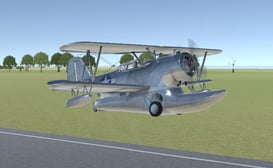
3D Flight Simulator




3D Flight Simulator
About 3D Flight Simulator
Experience the thrill of aviation from the comfort of your browser with 3D Flight Simulator. This game offers a compelling blend of realistic flight physics and accessible arcade-style controls, making it enjoyable for both casual players and aviation enthusiasts. You will start by choosing from a selection of detailed aircraft, each with unique handling characteristics. Your mission is to navigate through dynamic weather conditions, complete various flight challenges, and land safely at airports around a vast, open world. The game features stunning 3D graphics that bring the skies, clouds, and landscapes to life. Whether you are performing barrel rolls, navigating through narrow canyon passes, or executing a perfect landing in crosswinds, 3D Flight Simulator provides a deeply engaging and rewarding piloting experience that tests your skill and precision.
Features of 3D Flight Simulator
- ✓Realistic flight physics and detailed aircraft models for an authentic piloting feel
- ✓Multiple aircraft to unlock and master, from nimble stunt planes to large passenger jets
- ✓A vast open world with diverse environments including cities, mountains, and oceans
- ✓Dynamic day-night cycle and changing weather conditions that affect flight
- ✓Challenging missions and free flight mode for endless exploration
- ✓Intuitive controls that are easy to learn but difficult to master in this 3D Flight Simulator
How to Play 3D Flight Simulator
Use the W, A, S, D keys or arrow keys to control the pitch and roll of your aircraft.
Adjust your throttle using the Shift and Ctrl keys to manage speed for takeoff and landing.
Follow the on-screen indicators and mission objectives to navigate and complete challenges in the 3D Flight Simulator.
Pro Tips of 3D Flight Simulator
Take off and land into the wind for better control and shorter runway requirements.
Use gentle control inputs. Overcorrecting with the joystick or keys will cause your plane to oscillate and become unstable.
Monitor your airspeed, especially during climbs and turns, to avoid stalling the aircraft.
Practice landing approaches in the free flight mode of the 3D Flight Simulator before attempting difficult mission landings.
When flying in bad weather, reduce your speed and increase your vigilance for other aircraft or terrain.
Learn the specific performance envelope of each aircraft; a stunt plane can turn much tighter than a heavy jet.
Player Feedback on 3D Flight Simulator
This is the most realistic browser-based flight sim I have found. The physics are spot on, and the graphics are beautiful. I can spend hours just flying around.
Incredible game! The different planes handle so uniquely. Landing the big jet is a real challenge, but it feels amazing when you get it right.
Very fun and addictive. The controls are simple to pick up. I wish there were a few more planes to unlock, but overall it is a fantastic experience.
Perfect for a quick flight session. The 3D Flight Simulator runs smoothly and the missions keep me coming back. The night flying with city lights is stunning.
Great simulator for learning basic flight principles. It is challenging but fair. The stall mechanics are very well implemented.
I have played many flying games, and this one stands out. The sense of speed and altitude is fantastic. Doing aerobatics over the mountains is my favorite thing.
Love the exploration aspect. Finding all the hidden airports is a fun goal. The game is very polished and runs great on my laptop.
A solid arcade-style sim. It is not as complex as dedicated software, but for a free browser game, it is incredibly impressive and enjoyable.
FAQs about 3D Flight Simulator
What are the basic controls for the game?
You primarily use the W/A/S/D or Arrow keys to control the aircraft pitch and roll. The Shift key increases throttle, and the Ctrl key decreases throttle. The mouse can also be used for camera control.
Is there a way to change the view from inside the cockpit?
Yes, you can cycle through different camera views, including cockpit, chase, and free camera, by pressing the C key during flight.
How do I unlock new airplanes?
New aircraft are typically unlocked by completing specific missions or achieving certain milestones, like performing a perfect landing or reaching a high altitude.
Can I play this game on a mobile device or tablet?
This 3D Flight Simulator is designed for browsers on desktop and laptop computers. It requires a keyboard for optimal control and may not function correctly on touchscreen devices.
Why does my plane keep stalling when I try to climb?
A stall occurs when the wing loses lift, often from climbing at too steep an angle with insufficient speed. Reduce your climb angle and apply more throttle to maintain airspeed.
Are there any multiplayer features?
No, this version of the simulator is a single-player experience focused on individual flight challenges and exploration.
My game is running slowly. What can I do?
Try lowering the graphics quality settings in the game menu. Closing other browser tabs and applications can also free up system resources for a smoother experience.
How do I perform aerobatic maneuvers like loops and rolls?
For a loop, build up speed in level flight, then pull back firmly on the stick (S key) and maintain throttle. For an aileron roll, simply press A or D firmly while in level flight.
Is there a way to save my game progress?
Yes, the game automatically saves your progress, including unlocked planes and completed missions, using your browser local storage.
What is the objective of the game?
The main objectives are to complete various flight missions, explore the open world, master flying all aircraft, and safely execute takeoffs and landings under different conditions.